How To Download Data From Samsung Health
How to excerpt your personal Samsung Health data

This article is a brusque tutorial for all you lot self-trackers who want to see and play around with your personal Samsung Health information.
If you lot accept a Samsung mobile phone, you are probably familiar with the "Samsung Health" app that comes preinstalled with it.

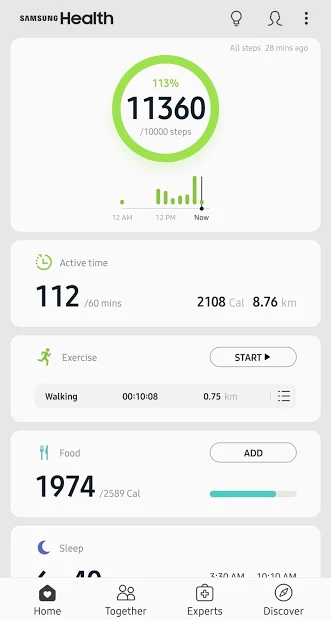
When activated, the app collects data nigh your activity in unlike ways using different sensors. Some attributes gathered automatically and some yous need to input manually.
Me, equally a mega cocky-tracking geek, who wants to collect even more than information and practice it more than efficiently and quickly, also have a Samsung S2 archetype watch that I article of clothing almost 24 hours a day. Except when It's charging of-class.
Expert tip: To reduce the time I'chiliad non wearing the sentinel, I remove it for charging every time I take a shower. This is an excellent time to accept it off, every bit this version is non water resistant.
What data can the app collect?
- It counts your steps. (Automatic)
- It shows you your active time. (Automatic)
- It can track your weight. (Manually or using some external device)
- Information technology tracks your water and caffeine intake. (Manually)
- It can record your sleep time and efficiency. (Manually or using some external device)

Considering I wear my Samsung S2 watch while I sleep, It as well works as a sleep monitoring device and collects my sleep activity automatically.
Other metrics like Caffeine consumption and Water intake I record manually.
Although I'm using my smartwatch and not the app on my telephone to record every loving cup of coffee I drinkable, It's nonetheless not an easy task to make this manual recording process into a habit.

Then how do you get your hands on this precious and heady data?
- From Samsung Health app primary screen, tap the 3 dots tiptop right kebab menu
- tap the SETTINGS option
- Scroll downwards to Data section and tap DOWNLOAD PERSONAL DATA
- Tap DOWNLOAD.


When complete — it tells you where it was downloaded to. Probably it will be in "My Files > Internal storage > Samsung Wellness > Download > samsunghealth_<YOUR USER Proper name>_201901032259"
From this indicate, you can get the files in any mode you like. Here is my favorite way:
- Apply My Files app to browse to that location
- Select the folder (Long press)
- Tap the 3 dots top correct kebab menu and select Zip to put it all in one file
- Select the created Zip file and tap SHARE to share it with yourself via E-mail or salvage it to your google bulldoze or any other sharing method you use.
- Unzip the file on your computer, and here y'all go. xix CSV files with all your information — one per attribute.

This is not the END; It's Only the Beginning.
You also get a folder with a very very very big amount of JSON files, where you accept more information to play with.
In some of the CSV files, yous get some processed data, like in
"com.samsung.shealth.sleep_data.csv"
all the same, you can run into the total readings in JSON format 1 per every mean solar day in the "jsons" folder.
How practice I use some of the information near myself?
One cool project I'm working on for quite a while is a dashboard web application that shows more than insights about my coffee consumption habits.
You can read more near this projection here:
Also, I created an open-source projection that lets you excerpt your data from the coffee consumption CSV file. (Yous are welcome to contribute your lines of code to meliorate it)
An idea I had in one case is to cross geolocation data I extracted nigh myself from Google Maps (Tutorial on how to do is coming shortly) with dates and fourth dimension I drank each coffee cup and show all the countries and cities I drank java in.
Phone call to action

Have any interesting/crazy ideas to what you can do with the data?
Please go out your comments beneath or through my Twitter.
DOWNLOAD HERE
Posted by: patchetthiguess.blogspot.com


0 Komentar
Post a Comment